Open Portal and verify your CafeID
On first launch GCafe Portal reads the CafeID from GCafe Billing. If it cannot, verify the shop by CafeID or phone number and OTP.
Before you start
- Portal is installed on the server running GCafe Billing.
- You know the shop’s CafeID, or the phone number registered with HubServices.
Verify with your CafeID
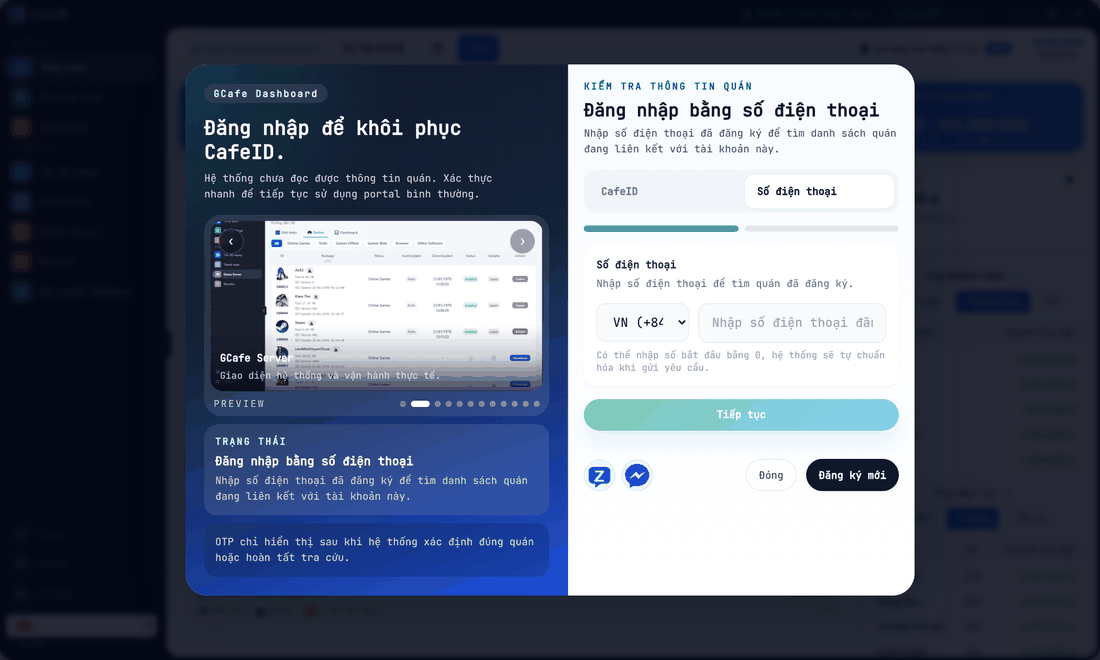
- Choose the CafeID tab, enter the 7-digit CafeID, click Tiếp tục (Continue).
- An OTP is sent to the shop’s registered phone number.
- Enter the OTP and click Xác thực OTP (Verify OTP).
Result: the CafeID is saved and Portal opens the Overview screen.
Verify with your phone number
- Choose the Số điện thoại (Phone number) tab, pick the country code, enter the registered number (a leading 0 is fine), click Tiếp tục.
- Pick your shop from the list of shops linked to that number, click Gửi OTP (Send OTP).
- Enter the OTP and click Xác thực OTP.
Sync the CafeID into the server
If the CafeID Portal received differs from the one stored in GCafe Billing, Portal asks Đồng bộ CafeID vào máy chủ? (Sync CafeID into the server?). Confirm to write the correct CafeID into GCafe Billing, or choose Để sau (Later).
⚠️ Note: If GCafe+ Server is running, Portal briefly closes it, writes the CafeID and reopens it. Do this when the shop is quiet.
No CafeID yet: click Đăng ký mới (Register) and fill in the shop details, or contact support via Zalo / Messenger right on the screen.
Common errors
Message / symptom | Cause | What to do |
|---|---|---|
CafeID phải gồm đúng 7 chữ số. (CafeID must be exactly 7 digits.) | Too few or too many digits. | Check the CafeID on your contract or in GCafe Billing. |
Số điện thoại phải có từ 8 đến 11 chữ số. (Phone must have 8–11 digits.) | Invalid phone format. | Re-enter the number without the country code. |
No OTP received | The registered number changed, or the mobile network is slow. | Wait 1–2 minutes and resend; if it still fails, ask support to update the phone number. |