Machine groups and prices per group
Machine groups let you charge different prices in different areas, such as standard and VIP PCs. Each machine group has its own price for every user group (walk-in, member…).
Create a machine group
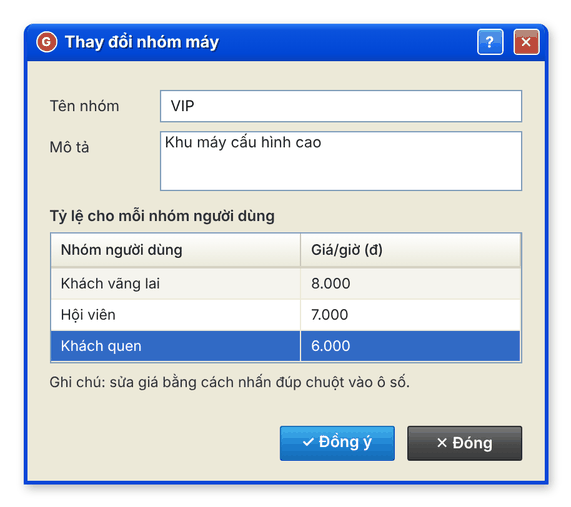
- Open the Nhóm máy (Machine groups) tab and click Add (+). The Thay đổi nhóm máy dialog opens.
- Enter Tên nhóm (group name, e.g. VIP) and Mô tả (description) if needed.
- In the Tỷ lệ cho mỗi nhóm người dùng (rate per user group) table, double-click each user group's price cell and enter the hourly price.
- Click Đồng ý (OK).
New interface

Classic interface
Edit or delete a machine group
- Edit: select the group, click Edit (✎), change it, click Đồng ý.
- Delete: select the group, click Delete (✕), then Yes. Default machine groups cannot be deleted.
Assign client PCs to a group
- On the Nhóm máy tab, click the button that manages the PCs in a group.
- Use > / >> to move one / all PCs into the group, < / << to move them back.
- Click Đồng ý to save.
⚠️ Note: A client PC that is in use cannot change group. Wait until the customer signs out.
New prices apply to sessions started after you save.