Build the revenue book for tax (S1a-HKD)
The Báo Cáo Thuế (Tax report) page builds the S1a-HKD revenue book from GCafe Billing transactions and exports it to Excel.
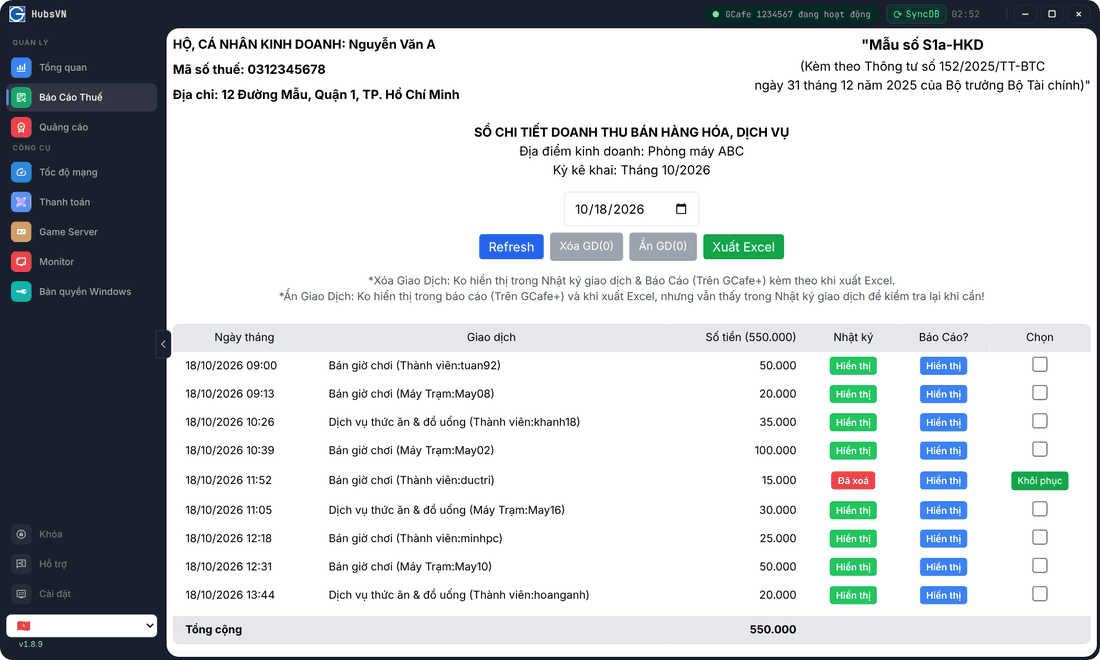
View a month’s book
- Click Báo Cáo Thuế in the left menu.
- Pick any day in the month you need — the book lists every transaction of that month (Kỳ kê khai, the filing period).
- Click Refresh after new transactions.
Each row is one transaction: Bán giờ chơi (play time), Dịch vụ thức ăn & đồ uống (food & drinks) or Hoàn tiền khách hàng (refund, negative), with the member or client PC name.
The business name, tax code and address at the top come from the shop’s registered details. To change them, contact support.
Export to Excel
Click Xuất Excel (Export Excel). The file keeps the book layout and leaves out deleted or hidden transactions.
Delete or hide transactions
Action | Transaction log (GCafe+) | Reports (GCafe+) & Excel |
|---|---|---|
Xóa GD (Delete) | Not shown | Not shown |
Ẩn GD (Hide) | Still shown (for later checks) | Not shown |
- Tick Chọn (Select) on the transactions.
- Click Xóa GD or Ẩn GD (the number in brackets is how many are selected).
- Click Xác nhận (Confirm).
Deleted transactions have a Khôi phục (Restore) button.
⚠️ Note: To write the change, Portal has to close GCafe+ Server. Do this when the shop is quiet and reopen GCafe+ Server afterwards.