Manage Windows licenses for client PCs
Bản quyền Windows (Windows licensing) keeps the shop’s product-key pool and assigns and activates Windows on each client PC.
Product keys are encrypted at rest; only the last 5 characters are shown by default.
How it works
- You add licenses to the Kho license (License pool).
- Client PCs (with the activation tool in the image) register with Portal automatically.
- You approve each PC and assign a license; the PC activates Windows by itself.
Overview tab
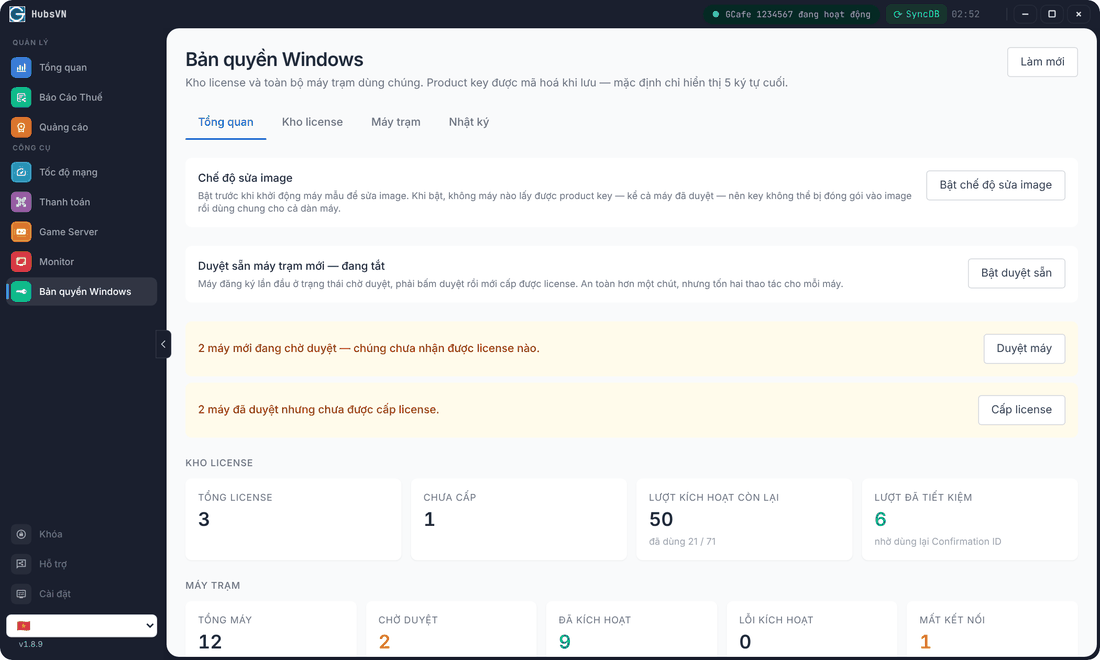
- Yellow rows are to-dos (PCs awaiting approval, PCs without a license…); the button next to each takes you to the right place.
- Kho license: total licenses, unassigned, activations left, activations saved by reusing Confirmation IDs.
- Máy trạm (Clients): total, awaiting approval, activated, activation errors, offline.
Image maintenance mode
Click Bật chế độ sửa image (Turn on image maintenance) before booting the master PC to edit the image. While on, no PC receives a product key — so a key cannot be baked into the image and shared by the whole fleet. When done, click Tắt chế độ sửa image.
Auto-approve new clients
Bật duyệt sẵn (On): a PC registering for the first time is approved immediately, leaving only the license step. Tắt (Off): you approve each new PC — safer, but one more click per PC.